has a carb value of
for every grams in weight*
Fill in the details above and click on the SAVE button at the bottom to add your food item
* 100 Grams is specified by default, This value can be changed however.
Carb Calc provides you with the ability to create your own small database (or food list) of the foods you eat most, and attach a carb value to those foods.
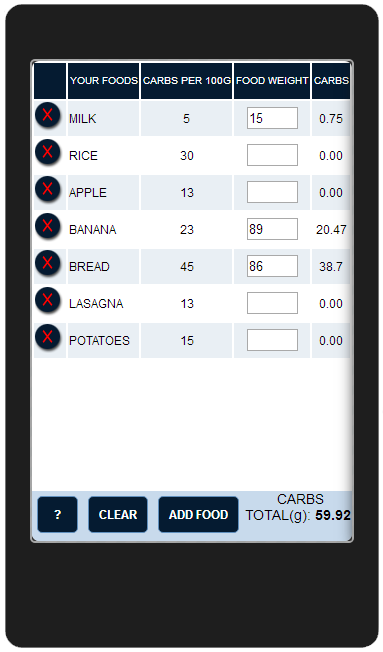
Once a food item has been added to your list you can then specify a weight for a portion of that food and get a carb value for it.
Adding A New Food
Getting a Carb Value For Your Foods
Saving Your Carb Calc Data and Sharing it Between Devices
Please note you will need an internet connection to save and share your data
You can save the data that you have stored on your device by doing the following:
You can import a Carb Calc list by doing the following:
There is now an on-line version of this app so you can check carb values on your computer or laptop. Go to http://carbcalc.diabetes.gb.net to try it out.
If you have any any questions or problems with this app can you please contact me on carbcalc@diabetes.gb.net or contact me through my website at http://www.diabetes.gb.net/apps/carbcalc with a description of the issue and I'll try to work out what is going wrong

Clear food weights when app loads.
Show Carbs per 100g weight column.
Carb ratio for 1 unit of insulin (leave at 0 to not use)
Please note that you will need an internet connection on your device to export or import a Carb Calc list
To import a Carb file, type in the file reference you have into the box below and click the 'IMPORT CARB CALC DATA' button.
Please note: the file you import will overwrite the carb list you currently have on this device.
